Two people just took the same last spot.
Trigger-based limiters check after the response lands. Form Slots settles each booking on its own server, one at a time.
The limit is not the hard part. The timing is.
The response is already recorded
Google Forms runs an add-on script once a submission has landed. When a popular slot fills in the same few seconds, several responses get in before the count is checked again, and the same seat is handed out twice.
One booking is decided at a time
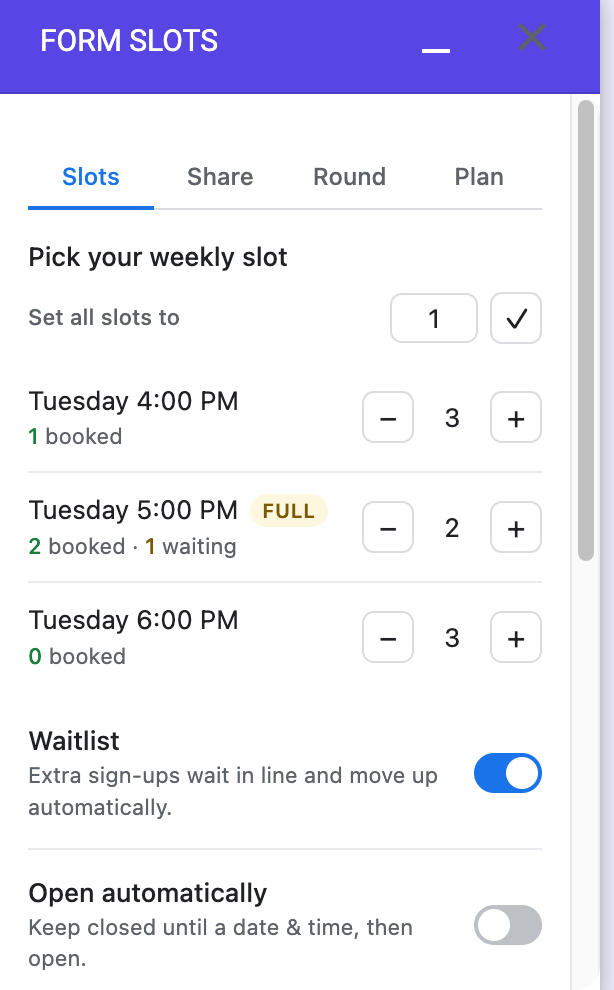
Every submission is reconciled on our server, one at a time per form, against the responses themselves. The seat is either yours or it is not. Anyone past the limit goes to the waitlist instead.
Respondents just see a normal form
When a slot fills up, that option comes off the live form. You share your form's usual link or QR code. There is no separate URL to break.
What it handles for you
An automatic waitlist
Extra sign-ups wait in line in the order they arrived. When someone drops or you raise a limit, the next person is promoted on their own, and they get told. You do not reconcile a spreadsheet.
Opens and closes on time
Hold the form closed until a date and time, then open it. Close it at another. No minimum window.
A cap for the whole form
Stop everything after a total number of responses, with your own closing message.
A reset that keeps your data
Starting a new round copies every response to a fresh Google Sheet before anything is cleared.
Your branching still works
Questions that send people to different sections keep doing it, even once a full option is hidden.
Set up on the form you already have
Install and open it
Add Form Slots from the Google Workspace Marketplace, then open it inside your form.
Give each option a limit
Pick the question, set a number per choice, and turn on the waitlist or a schedule.
Share it as usual
Send the normal link. Full options close themselves and the waitlist moves on its own.
The price is on the page
One active form is free forever, with every feature. Pay only when you run more than one at a time.
- Every feature, nothing held back
- Per-option limits with no overbooking
- Automatic waitlist and promotion
- Scheduled open and close, and a total cap
- QR sharing, and reset with a Sheet backup
- Everything in Free
- As many active forms as you want
- Priority email support
Prices in USD. Local taxes are calculated at checkout. Payments are handled by Paddle, our Merchant of Record.
Questions people ask first
Do respondents need a special link?
No. Share the form's normal published link or QR code. Full options are hidden on the live form so nobody can pick them.
What does it access?
Only the form you install it in: its questions, its responses, and the ability to open, close, and update that form's options. It creates a Google Sheet only when you reset a round. See the privacy policy.
What happens to the waitlist?
People wait in the order they signed up. When a confirmed booking is removed or you raise a limit, the next person is confirmed automatically.
Can I lower a limit after people booked?
Yes, and nobody loses their place. Confirmed bookings are never revoked. The slot simply closes to anyone new and the panel tells you it is over its limit.
Does it work on checkboxes and dropdowns?
Yes. Multiple choice, dropdown, and checkbox questions all work. Grid questions are not supported yet.
Where do my responses live?
In your own Google account, as always. Form Slots manages the limits and the waitlist. Backup sheets it creates belong to you.